> ## Documentation Index
> Fetch the complete documentation index at: https://docs.myperch.io/llms.txt
> Use this file to discover all available pages before exploring further.
# Lead Management
> Submit client referrals and track their mortgage progress with Perch’s authenticated embed.
***
## Get Started
**Choose the role that best describes you to begin submitting and managing leads.**
For licensed real estate agents. Submit leads for your own clients who need mortgage financing through Perch.
For business owners. Submit leads on behalf of your company and access all leads submitted under your organization.
For staff and franchisees. Submit leads as yourself while working under your partner organization.
***
## About the Lead Management Embed
The Lead Management embed is Perch's first [authenticated embed](/embeds/authenticated-embeds), combining two widgets in one:
* **Lead Submission Widget** - Submit client referrals using a branded form
* **Lead Review Widget** - Track financing progress in real time from pre‑approval through funding
New to Perch's data model? Read [Leads and Plans](/core-concepts/leads-and-plans) to understand how submissions move through the mortgage lifecycle.
***
## Static Widget Implementation
We've implemented a new static widget system that provides simplified integration for Lead Management embeds using predefined identifiers. This offers two deployment options: **direct URL access** or **embedded widget integration**.
### Direct URL Access
**Pre-configured embed URLs for immediate use:**
* **For Brokerage Managers:**\
[https://embeds.myperch.io/static/realtor/firm](https://embeds.myperch.io/static/realtor/firm)
* **Form Submitters (Realtors):**\
[https://embeds.myperch.io/static/realtor/firm-member](https://embeds.myperch.io/static/realtor/firm-member)
* **For Partner Managers:**\
[https://embeds.myperch.io/static/partner/firm](https://embeds.myperch.io/static/partner/firm)
* **Form Submitters (Team Members):**\
[https://embeds.myperch.io/static/partner/firm-member](https://embeds.myperch.io/static/partner/firm-member)
### Widget Embedding
For website integration, use static widget IDs with the [embed code structure](/embeds/implementation#basic-embed-code-structure):
**Available static widget IDs:**
* `static-partner-firm` - Partner firm-level lead management
* `static-partner-firm-member` - Individual partner member lead management
* `static-realtor-firm` - Realtor firm-level lead management
* `static-realtor-firm-member` - Individual realtor member lead management
See our [Implementation Guide](/embeds/implementation) for embedding instructions.
***
## Using the Lead Management Embed
### Authentication
Access via public URLs or embed in your CMS. Users can sign up or use Google Sign In.
Embed access is limited to approved team members. New sign-ups automatically notify your Perch Representative, who will follow up within 2 business days.
### Lead Submission
Once logged in, users access the **Lead Submission** form designed for real-time client interactions—perfect for ISAs or agents submitting while on a call.
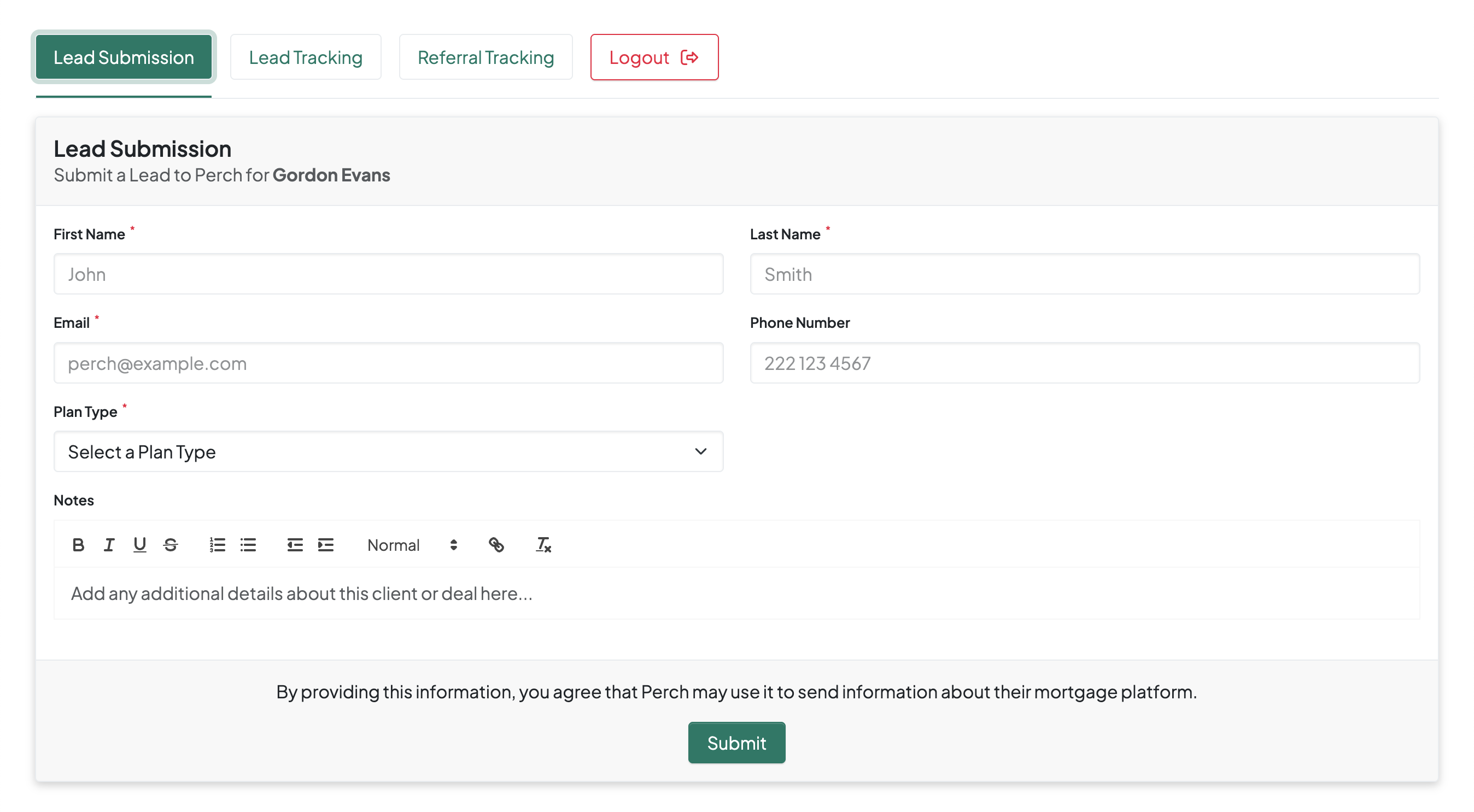 **Required fields:**
* First & Last Name
* Email
* Plan Type (e.g. Buying, Switching, Refinancing)
**Optional fields:**
* Phone Number
* Notes (for context)
### Lead Review
The **Lead Review** tab shows all leads submitted by the user (or firm, depending on access).
**Each entry includes:**
* Name & Email
* Invite and Conversion Dates
* Active Plan Status (e.g. *"Pre-Approved | \$400,000"*)
**Required fields:**
* First & Last Name
* Email
* Plan Type (e.g. Buying, Switching, Refinancing)
**Optional fields:**
* Phone Number
* Notes (for context)
### Lead Review
The **Lead Review** tab shows all leads submitted by the user (or firm, depending on access).
**Each entry includes:**
* Name & Email
* Invite and Conversion Dates
* Active Plan Status (e.g. *"Pre-Approved | \$400,000"*)
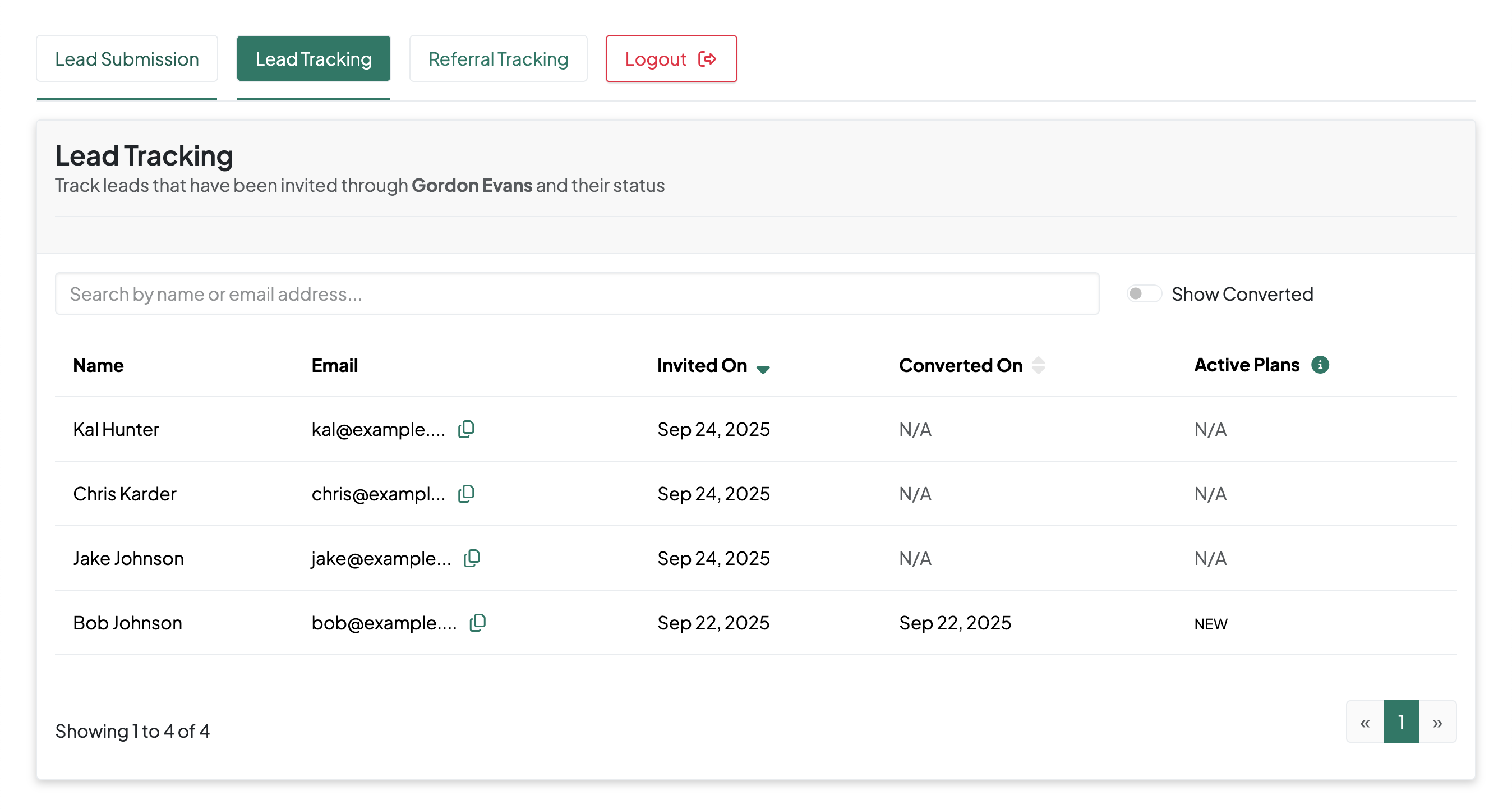 **Available actions:**
* Toggle **Show Converted** to filter leads
* Click the icon next to Email to copy client contact
* Export CSVs (coming soon) to integrate with your CRM
**Access control:**
* Firm owners see all firm leads
* Individual members see only their submitted leads
**Available actions:**
* Toggle **Show Converted** to filter leads
* Click the icon next to Email to copy client contact
* Export CSVs (coming soon) to integrate with your CRM
**Access control:**
* Firm owners see all firm leads
* Individual members see only their submitted leads