> ## Documentation Index
> Fetch the complete documentation index at: https://docs.myperch.io/llms.txt
> Use this file to discover all available pages before exploring further.
# Integration Options
> Choose from Perch's three core integration models - from simple referrals to full API control.
Perch offers three core integration models, grouped by reporting capabilities and technical requirements. These models help partners understand the trade-offs between simplicity and control, with each offering progressively deeper insights into client mortgage journeys. While partners can combine approaches or customize beyond these models, these represent our primary integration paradigms. Choose the model that best fits your business needs and technical capabilities.
Before choosing your integration option, it may be beneficial to learn about how Perch has structured our [core API resources (Leads & Plans)](/core-concepts/leads-and-plans) to help facilitate your decision.
## Integration Options Overview
**Aggregate Reporting**
Best for partners who want to earn commissions, but don't need intimate insights into progress and tracking.
**Medium Control + Insights**
Best for non-technical partners who need deeper insights into client progress.
**Full Control + Insights**
Best for technical partners who need deeper insights and want full control over their client experience.
***
## Referrals & Widgets
`Aggregate Reporting`
Drive referrals to Perch by sharing your **Referral Link** on your website, social media, in your email signature, etc., or by embedding one of Perch's [embeddable tools](/embeds/overview) to earn a commission on each funded deal.
**Best for:** Partners who want to earn commissions, but don't need intimate insights into client deal progress and tracking.
### How It Works
Referral Links & Widgets direct users to Perch's customizable [signup page](https://app.myperch.io/auth/sign-up?referralCode=EXAMPLE) with your referral code, company logo (or photo), and a customizable welcome message.
Users sign up and are automatically tagged with your referral attribution. You're notified via email when a client signs up and when their deal funds. In addition to email alerts, you can also track your referrals [via API](/getting-started/overview) and through our [lead submission tools](/embeds/lead-management).
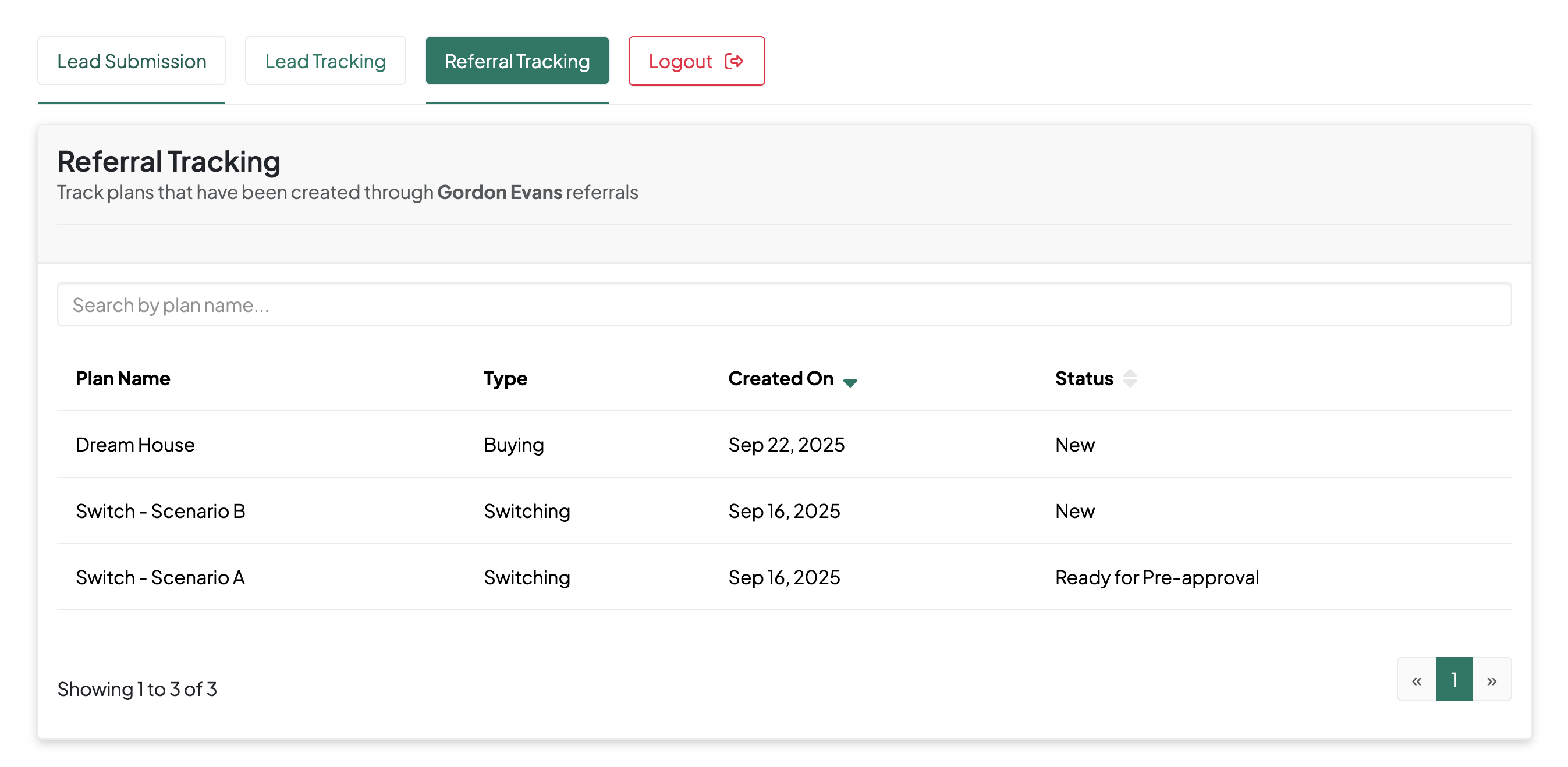 Perch pays a commission on each funded deal.
### Data Access Capabilities
* **Aggregate reporting only** - conversion emails and referral counts
* **No PII access** - deal details are provided in aggregate and do not disclose client PII
### Why Limited Access?
When users simply click through widgets or referral links, there's no established data sharing relationship. The client hasn't explicitly consented to share their personal information with the referring partner beyond basic attribution.
### Getting Started
* Explore available [embeddable widgets](/embeds/overview) for your website
* Implement widgets following our [implementation guide](/embeds/implementation)
* Contact your Perch representative to get your referral code or setup a widget
***
## Lead Management Tools
`Light Reporting, Control & Insights`
Perch's Lead Submission tools can be [accessed via URL](/embeds/lead-management) or [embedded directly](/embeds/implementation) into your CRM for a more seamless submission experience.
**Best for:** Non-technical partners who need deeper insights into client deal progress.
### How It Works
Access lead submission tools [directly](/embeds/lead-management) or [embed them](/embeds/implementation) into your CRM
Submit client details and financing needs through the lead submission form
Monitor the client's mortgage journey from pre-approval through funding
Receive commission payments on successfully funded deals
**The Key Difference:** Unlike referral codes where clients sign up independently, submitting structured lead data establishes you as the originating partner with explicit consent. This creates a direct business relationship that grants you ongoing access to client information and deal progress through our authenticated tools and the API.
### Data Access Capabilities
* **Simplified data submission** - provide the basics like name, email, deal purpose and notes (to submit a richer client profile (assets, debts, employment, etc.), consider using our [API integration](#api-integration))
* **Full lead tracking** - monitor conversion from referral to funding
* **Application status visibility** - see where clients are in the mortgage process
* **Plan details access** - view pre-approval amounts, application stages
* **Email notifications** - get alerts when leads convert and reach milestones
### Getting Started
* Review our [lead management tool guide](/embeds/lead-management) for implementation details
* Read about [embeds](/embeds/overview) to explore how you can embed our tools into your CRM
* Contact your Perch representative to set up custom or branded versions of lead management tools
***
## API Integration
`Deep Reporting, Control & Insight`
Our direct API integration gives you full control over your lead submission and monitoring experience. Unlike simpler integration options, the API allows you to submit a complete client profile including items like assets, debts, residence history, employment details, and more—helping your clients expedite their mortgage journey to get pre-approved faster.
**Best for:** Technical partners who need deeper insights and want full control over their client experience. Check out our [quick-start guide](/api-reference/submitting-and-tracking-leads) to learn how to submit and track leads through the Perch API.
### How It Works
Integrate your platform with Perch's API through a direct code integration or via Zapier
Use our `/leads` endpoint to track leads, make updates and monitor for conversion (sign-up)
Use the API to include `Plans` in your request (e.g. `GET /leads?include=Plans`) to access key insights like deal status
Use deep plan insights to follow up with your clients, automate various actions
Earn commission when your deals fund
### Data Access Capabilities
* **Complete API access** - full `CRUD` permissions on `Leads` and `Read` permission on associated `Plans`
* **Custom integrations** - build tailored workflows for your business needs
* **Bulk operations** - efficiently manage large volumes of leads
### Zapier Integration
Perch's Zapier integration (available via invite only) enables automated lead submission from your Zapier-compatible CRM systems directly to our platform. Use Zapier's visual workflow builder to create automated workflows that sync leads without writing any code, while maintaining full access to Perch's lead tracking and management tools.
Perch pays a commission on each funded deal.
### Data Access Capabilities
* **Aggregate reporting only** - conversion emails and referral counts
* **No PII access** - deal details are provided in aggregate and do not disclose client PII
### Why Limited Access?
When users simply click through widgets or referral links, there's no established data sharing relationship. The client hasn't explicitly consented to share their personal information with the referring partner beyond basic attribution.
### Getting Started
* Explore available [embeddable widgets](/embeds/overview) for your website
* Implement widgets following our [implementation guide](/embeds/implementation)
* Contact your Perch representative to get your referral code or setup a widget
***
## Lead Management Tools
`Light Reporting, Control & Insights`
Perch's Lead Submission tools can be [accessed via URL](/embeds/lead-management) or [embedded directly](/embeds/implementation) into your CRM for a more seamless submission experience.
**Best for:** Non-technical partners who need deeper insights into client deal progress.
### How It Works
Access lead submission tools [directly](/embeds/lead-management) or [embed them](/embeds/implementation) into your CRM
Submit client details and financing needs through the lead submission form
Monitor the client's mortgage journey from pre-approval through funding
Receive commission payments on successfully funded deals
**The Key Difference:** Unlike referral codes where clients sign up independently, submitting structured lead data establishes you as the originating partner with explicit consent. This creates a direct business relationship that grants you ongoing access to client information and deal progress through our authenticated tools and the API.
### Data Access Capabilities
* **Simplified data submission** - provide the basics like name, email, deal purpose and notes (to submit a richer client profile (assets, debts, employment, etc.), consider using our [API integration](#api-integration))
* **Full lead tracking** - monitor conversion from referral to funding
* **Application status visibility** - see where clients are in the mortgage process
* **Plan details access** - view pre-approval amounts, application stages
* **Email notifications** - get alerts when leads convert and reach milestones
### Getting Started
* Review our [lead management tool guide](/embeds/lead-management) for implementation details
* Read about [embeds](/embeds/overview) to explore how you can embed our tools into your CRM
* Contact your Perch representative to set up custom or branded versions of lead management tools
***
## API Integration
`Deep Reporting, Control & Insight`
Our direct API integration gives you full control over your lead submission and monitoring experience. Unlike simpler integration options, the API allows you to submit a complete client profile including items like assets, debts, residence history, employment details, and more—helping your clients expedite their mortgage journey to get pre-approved faster.
**Best for:** Technical partners who need deeper insights and want full control over their client experience. Check out our [quick-start guide](/api-reference/submitting-and-tracking-leads) to learn how to submit and track leads through the Perch API.
### How It Works
Integrate your platform with Perch's API through a direct code integration or via Zapier
Use our `/leads` endpoint to track leads, make updates and monitor for conversion (sign-up)
Use the API to include `Plans` in your request (e.g. `GET /leads?include=Plans`) to access key insights like deal status
Use deep plan insights to follow up with your clients, automate various actions
Earn commission when your deals fund
### Data Access Capabilities
* **Complete API access** - full `CRUD` permissions on `Leads` and `Read` permission on associated `Plans`
* **Custom integrations** - build tailored workflows for your business needs
* **Bulk operations** - efficiently manage large volumes of leads
### Zapier Integration
Perch's Zapier integration (available via invite only) enables automated lead submission from your Zapier-compatible CRM systems directly to our platform. Use Zapier's visual workflow builder to create automated workflows that sync leads without writing any code, while maintaining full access to Perch's lead tracking and management tools.
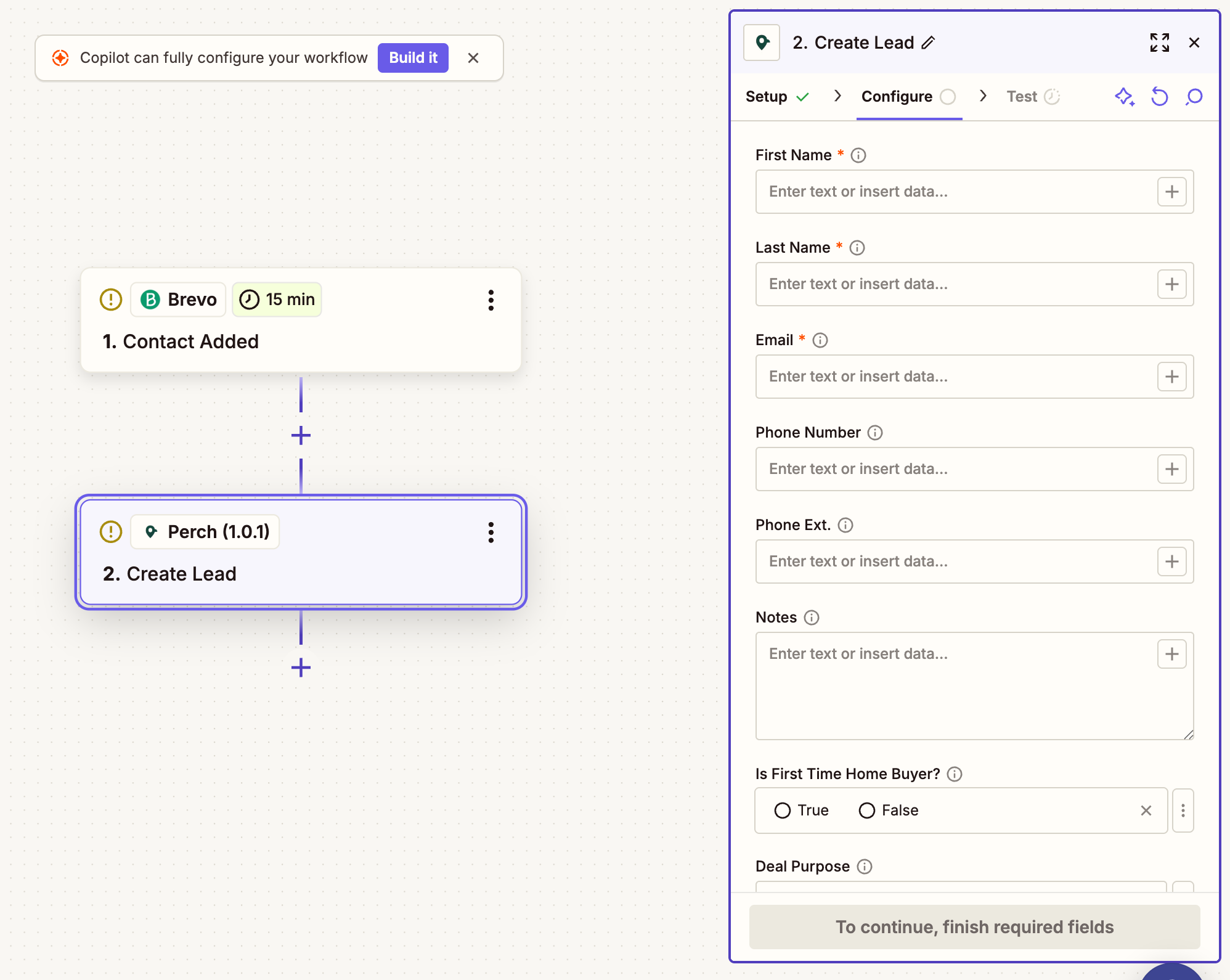 **Note:** Zapier integration enables one-way lead submission from your Zapier-compatible CRM to Perch. Contact your Perch representative to request access to our lead submission Zap.
### Getting Started
* Review [API authentication](/getting-started/authentication) requirements
* Explore the [lead submission guide](/api-reference/submitting-and-tracking-leads)
* Contact your Perch representative for API credentials access to our Zaiper integration or book an API discussion with our integration team
***
## Choosing Your Integration Option
### Ask Yourself:
1. **Do you need detailed client information and application status?**
* Yes → Medium or High Integration
* No → Low Integration may be sufficient
2. **Do you have technical resources for API integration?**
* Yes → Consider High Integration for maximum flexibility
* No → Medium Integration provides great capability without development
3. **Is your business involved during a certain point of the mortgage application (e.g. once a client is pre-approved, you need to take a certain action)?**
* Not involved → Low Integration may meet your needs
* Involved → You likely need Medium or High Integration
### Migration Path
You can always start with a lower integration option and upgrade:
* **Low → Medium**: Begin submitting leads through our tools
* **Medium → High**: Add API integration while keeping existing lead tools
* **Any Level**: Add referral widgets alongside other integration methods
***
## Access Policies & Privacy Protection
### Lead Ownership Model
Our data access policies are built around a simple ownership model:
1. **You submit a lead** → **You own the relationship** → **You'll maintain access to the data**
2. **You deployed a referral link** → **No ownership established** → **Limited to aggregate reporting**
### Privacy Boundaries
* **PII Protection**: Client personally identifiable information is only shared when there's an established business relationship through lead submission
* **Retroactive Access**: Plans created by clients after sign-up (without lead submission) remain private unless manually linked by Perch support
* **Consent-Based Sharing**: All data sharing is based on the initial consent established through lead submission
### Why We Can't Share All Referral Data
While it might seem logical that referring a client should grant full data access, privacy regulations and client expectations require explicit consent for data sharing. Simply clicking a referral link doesn't establish this consent—submitting a structured lead with client details does.
***
## Summary
| Integration Option | Data Access | Client PII | Application Status | Technical Requirements |
| ----------------------- | -------------------- | ---------- | ------------------ | ---------------------- |
| **Referrals & Widgets** | Aggregate only | ❌ No | ❌ No | Minimal |
| **Perch Tools** | Submitted leads only | ✅ Yes | ✅ Yes | None |
| **API Integration** | Full programmatic | ✅ Yes | ✅ Yes | Development |
Choose the option that matches your business needs and technical capabilities. You can always upgrade as your requirements evolve.
## Next Steps
Learn about the foundational objects that power the Perch platform.
Begin your integration journey with structured lead submission.
**Note:** Zapier integration enables one-way lead submission from your Zapier-compatible CRM to Perch. Contact your Perch representative to request access to our lead submission Zap.
### Getting Started
* Review [API authentication](/getting-started/authentication) requirements
* Explore the [lead submission guide](/api-reference/submitting-and-tracking-leads)
* Contact your Perch representative for API credentials access to our Zaiper integration or book an API discussion with our integration team
***
## Choosing Your Integration Option
### Ask Yourself:
1. **Do you need detailed client information and application status?**
* Yes → Medium or High Integration
* No → Low Integration may be sufficient
2. **Do you have technical resources for API integration?**
* Yes → Consider High Integration for maximum flexibility
* No → Medium Integration provides great capability without development
3. **Is your business involved during a certain point of the mortgage application (e.g. once a client is pre-approved, you need to take a certain action)?**
* Not involved → Low Integration may meet your needs
* Involved → You likely need Medium or High Integration
### Migration Path
You can always start with a lower integration option and upgrade:
* **Low → Medium**: Begin submitting leads through our tools
* **Medium → High**: Add API integration while keeping existing lead tools
* **Any Level**: Add referral widgets alongside other integration methods
***
## Access Policies & Privacy Protection
### Lead Ownership Model
Our data access policies are built around a simple ownership model:
1. **You submit a lead** → **You own the relationship** → **You'll maintain access to the data**
2. **You deployed a referral link** → **No ownership established** → **Limited to aggregate reporting**
### Privacy Boundaries
* **PII Protection**: Client personally identifiable information is only shared when there's an established business relationship through lead submission
* **Retroactive Access**: Plans created by clients after sign-up (without lead submission) remain private unless manually linked by Perch support
* **Consent-Based Sharing**: All data sharing is based on the initial consent established through lead submission
### Why We Can't Share All Referral Data
While it might seem logical that referring a client should grant full data access, privacy regulations and client expectations require explicit consent for data sharing. Simply clicking a referral link doesn't establish this consent—submitting a structured lead with client details does.
***
## Summary
| Integration Option | Data Access | Client PII | Application Status | Technical Requirements |
| ----------------------- | -------------------- | ---------- | ------------------ | ---------------------- |
| **Referrals & Widgets** | Aggregate only | ❌ No | ❌ No | Minimal |
| **Perch Tools** | Submitted leads only | ✅ Yes | ✅ Yes | None |
| **API Integration** | Full programmatic | ✅ Yes | ✅ Yes | Development |
Choose the option that matches your business needs and technical capabilities. You can always upgrade as your requirements evolve.
## Next Steps
Learn about the foundational objects that power the Perch platform.
Begin your integration journey with structured lead submission.